Moamen Hany AI Lab: Building a multi-agent with chatbot using Azure AI Foundry
Building a Private, Multi-Model Enterprise Chatbot on Azure Using Azure AI Agent Framework
(Integrating ChatGPT, Gemini, and Claude)
— Step-by-Step Guide Using “MoamenHanyAILab” Architecture**
Modern enterprises demand a secure, private, multi-model conversational agent capable of using the best LLM for every scenario. Azure now makes this easy through the Azure AI Agent Framework and Azure AI Foundry, enabling organizations to orchestrate multiple models—ChatGPT through Azure OpenAI, Gemini through API Management, and Claude through Foundry extensions—under a unified, governed architecture.
This article walks through the full end-to-end process of building such a solution using Azure resources named under a single environment prefix:
MoamenHanyAILab.
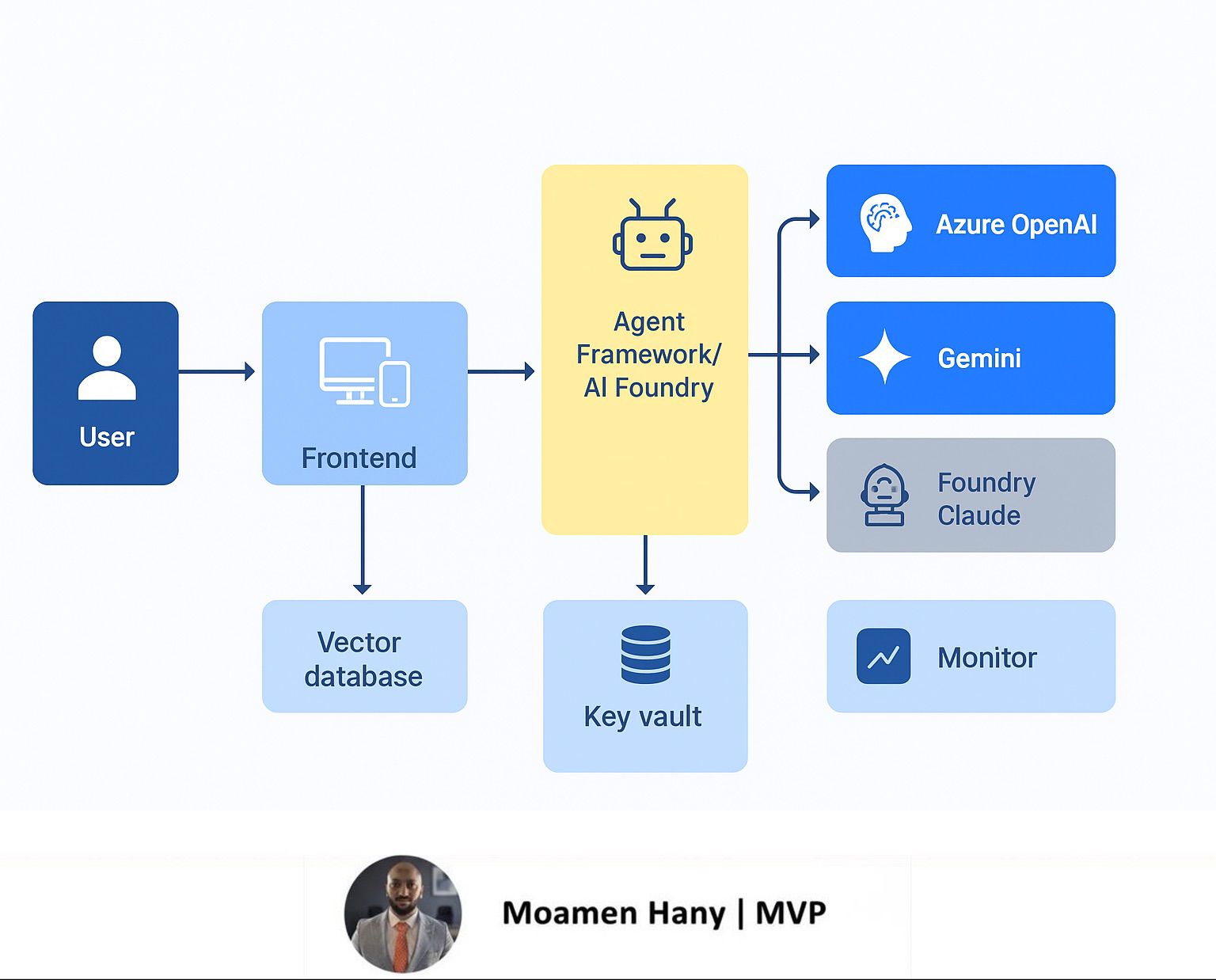
It also includes the complete solution architecture diagram, a detailed runtime sequence, and all required components.
1. Solution Overview
The goal is to create a private enterprise chatbot that can
✔ Integrate multiple LLM providers:
- Azure OpenAI (ChatGPT / GPT-4o / GPT-4.1)
- Gemini (via APIM secure routing)
- Claude (through Azure AI Foundry managed connectors)
✔ Run inside your Azure estate
Ensuring:
- Private endpoints
- Zero data retention
- Controlled logging
- Policy-based routing
- Memory & vector search
✔ Support secure enterprise channels
- Web
- Mobile
- Teams
- Internal applications
✔ Use Azure AI Agent Framework to orchestrate:
- Memory retrieval
- LLM model selection
- Safety checks
- Tool executions
- Prompt assembly
- Multi-provider routing
naming convention:
- web-MoamenHanyAILab-webapp (Frontend)
- apim-MoamenHanyAILab (API Management)
- orch-MoamenHanyAILab-AgentOrch (Orchestrator in Azure AI Foundry)
- vec-MoamenHanyAILab-search (Vector DB)
- kv-MoamenHanyAILab (Key Vault)
- MoamenHanyAILab-AzureOpenAI
- MoamenHanyAILab-GeminiAPI
- MoamenHanyAILab-Foundry-Claude
- connector-MoamenHanyAILab (Azure Functions or Logic Apps)
📌 Architecture Diagram (Already Produced)
Step 1 — Provision Core Azure Resources
Create a dedicated resource group:
RG-MoamenHanyAILab
Within it, deploy:
Azure Web App
web-MoamenHanyAILab-webapp
Used by frontend clients (web/mobile/Teams).
Azure API Management
apim-MoamenHanyAILab
Handles authentication (JWT), throttling, IP filtering, and routing.
Azure AI Foundry Workspace
orch-MoamenHanyAILab-AgentOrch
Runs:
- Agent framework
- Orchestration logic
- Tools & connector scripts
- Prompt management
Azure OpenAI
MoamenHanyAILab-AzureOpenAI
Deploy GPT-4o / GPT-4.1 models.
Vector Database
vec-MoamenHanyAILab-search
Azure Cognitive Search or CosmosDB + Vector Index.
Azure Key Vault
kv-MoamenHanyAILab
Stores:
- Azure OpenAI keys
- Gemini API keys
- Claude keys
- Foundry agent secrets
Azure Monitor / Log Analytics
log-MoamenHanyAILab-monitor
For full operational telemetry.
Azure Functions / Logic Apps
connector-MoamenHanyAILab
Implements multi-model connectors & API transformations.
Step 2 — Configure Multi-Model Provider Integration
2.1 Azure OpenAI (Primary LLM)
Deploy your chosen models:
- GPT-4.1 (chat)
- GPT-4o mini (fast tasks)
These models handle:
- Reasoning
- Summaries
- Creative content
- Corporate knowledge grounded answers
2.2 Gemini API (via APIM Secure Routing)
APIM outbound policy example:
<authentication-managed-identity resource="https://generativelanguage.googleapis.com"/>
<rewrite-uri template="/v1beta/models/gemini-pro:generateContent" />
Gemini is ideal for:
- Factual search
- Lightweight answers
- High-speed retrieval tasks
2.3 Claude via Azure AI Foundry Extension
Claude models run through the AI Foundry connector.
Best for:
- Compliance-heavy tasks
- Long document analysis
- Red-teaming–safe content
Step 3 — Implement Agent Framework Orchestrator
Inside Azure AI Foundry:
Create an Agent named:
MoamenHanyAILab-Orchestrator
The agent performs:
✔ Memory logic
- Retrieves top-k embeddings from vec-MoamenHanyAILab-search
- Decides if memory is required (similarity threshold)
- Stores new embeddings
✔ Prompt assembly
- System prompt
- User query
- Context chunks
- Agent instructions
✔ Model routing
Based on:
- Latency
- Safety requirement
- Context length
- Domain type
Example routing rule:
- Gemini → Short factual queries
- ChatGPT via Azure OpenAI → General reasoning
- Claude → Sensitive compliance / long analysis
✔ Safety processing
- PII redaction
- Safety filters
- Content policies
- Logging to log-MoamenHanyAILab-monitor
Step 4 — Build the Connector Layer
Azure Functions App:
connector-MoamenHanyAILab
Functions:
- RouteToOpenAI
- RouteToGemini
- RouteToClaude
Each connector:
- Retrieves secrets from Key Vault
- Converts the request to the provider’s schema
- Applies error-handling
- Returns unified response format for Orchestrator
Step 5 — Add Memory & Vector Search
Use:
Azure Cognitive Search
vec-MoamenHanyAILab-search
Store:
- Chat history
- Enterprise documents
- Embeddings (OpenAI or Gemini embeddings)
Memory logic:
- Compute embedding of user query
- Search top-k similar chunks
- Only include if similarity ≥ threshold
- Decide whether to store new memory
Step 6 — Build the Frontend & Authentication
Frontend App:
web-MoamenHanyAILab-webapp
Supports:
- Teams Bot
- Web interface
- Mobile applications
Authentication:
- Entra ID (Azure AD)
- JWT forwarded to APIM
- RBAC policies enforced
Step 7 — End-to-End Processing Flow
Below is the runtime sequence
(also shown visually in your architecture diagram):
- User sends a message
- JWT-authenticated request hits Frontend
- Request flows to APIM
- APIM applies policies
- Orchestrator analyzes query
- Retrieves memory (top-k embeddings)
- Runs decision tree (context or no context)
- Selects LLM provider
- Calls connector
- Provider responds
- Safety + PII checks
- Memory stored (if allowed)
- Final answer returned to user
- Logs sent to Monitor workspace
Step 8 — Ensure Compliance & Governance
✔ Private endpoints
✔ No data retention
✔ Token logging disabled
✔ Key Vault isolation
✔ APIM rate limits
✔ Central logging (Sentinel-ready)
This ensures the chatbot is fully suitable for enterprise & government projects.
Conclusion
By leveraging Azure AI Agent Framework, Azure AI Foundry, and a multi-model integration strategy, you can build an enterprise-grade chatbot that is:
- Secure
- Scalable
- Multi-provider
- Context-aware
- Memory-enabled
- Fully running inside Azure
The MoamenHanyAILab architecture provides a production-ready blueprint that organizations can reuse and extend for internal assistants, customer service bots, security copilots.
Moamen Hany